
Interac E Transfer Issues: How to Fix Common Problems

You've sent money, your banking app shows a transaction, and the recipient says nothing has arrived. Perhaps you're funding a transfer home, paying a supplier, or moving money into a wallet before a family payment. Sending again feels tempting, but it could leave you paying twice.
Most Interac e-Transfer issues need a more specific diagnosis than “Interac is down.” Start by separating a sender-bank restriction from a recipient problem or a confirmed service fault. The useful question isn't just where the money is, but what your bank's transaction record says happened to it.
Table of Contents
- Match Your Symptom to the Likely Cause
- How to Check a Stuck Interac Transfer Step by Step
- Why Large Transfers Get Declined and What Limits Apply
- Recipient, Expiry and Bank-Side Errors
- Fraud Risks and Habits That Prevent Failed Transfers
- Next Steps Before Your Next Interac Transfer
Match Your Symptom to the Likely Cause
| Symptom | Likely cause | First fix |
|---|---|---|
| Transfer still pending well past the usual window | Recipient hasn't accepted or deposited it yet, or processing remains incomplete | Check transaction history; cancel only if it's still pending and hasn't been deposited |
| Send declined before confirmation | Amount exceeds your bank's per-transaction or cumulative limit | Check available limits, then arrange permitted smaller sends or ask the bank to review |
| Recipient says no deposit arrived | Autodeposit is off, or the email or mobile number is wrong | Confirm contact details and ask the recipient to check Autodeposit settings |
| Recipient cannot answer the security question | Answer doesn't match the one you set | Resolve or cancel the original pending transfer before resending with a new question; communicate the answer privately |
| Transfer no longer available to claim | Transfer expired without being accepted | Check your balance and follow your bank's reclamation instructions |
| Money left your account but recipient has nothing | An account-level processing or deposit discrepancy needs investigation | Give your bank the timestamp, amount, recipient identifier, and reference number |
An unavailable transfer doesn't automatically mean lost money. A failed or expired transfer generally means funds haven't left the sender's account, but your balance and the bank's reclamation process still need checking.
Treat the table as a starting point
The same complaint can describe different situations. “Nothing arrived” might mean no notification, no deposit, or no wallet credit after a bank deposit. Ask the recipient which of those they mean before changing anything.
Likewise, a debit without an apparent deposit doesn't prove that the recipient's bank caused the problem. It identifies a discrepancy that the banks need to investigate, not a diagnosis you can establish from a screenshot alone.
A pending status also isn't permission to keep retrying. Check whether the recipient still needs to act, whether your bank has requested verification, and whether cancellation remains available.
Practical rule: Match the transaction record to the complaint before choosing a fix. An email describes a message; your banking history describes the payment.
Keep support and security separate
If someone contacts you offering to release a stalled payment, verify that request through your banking app or a known telephone number. A genuine payment problem can become an opening for a scam if you start sharing credentials or security answers.
For teams managing these conversations, Sift AI's guidance on handling scams and compliance gaps offers useful context for separating support requests from situations that need security escalation.
If you have just one transfer to resolve today, start with the row matching your bank's status, not the recipient's assumption. If the two accounts tell conflicting stories, preserve both records rather than sending a replacement.
How to Check a Stuck Interac Transfer Step by Step
Open your bank's app directly, rather than following a notification link. Keep the transfer details visible while you speak with the recipient, so you're both discussing the same payment.
Work through the transaction in order
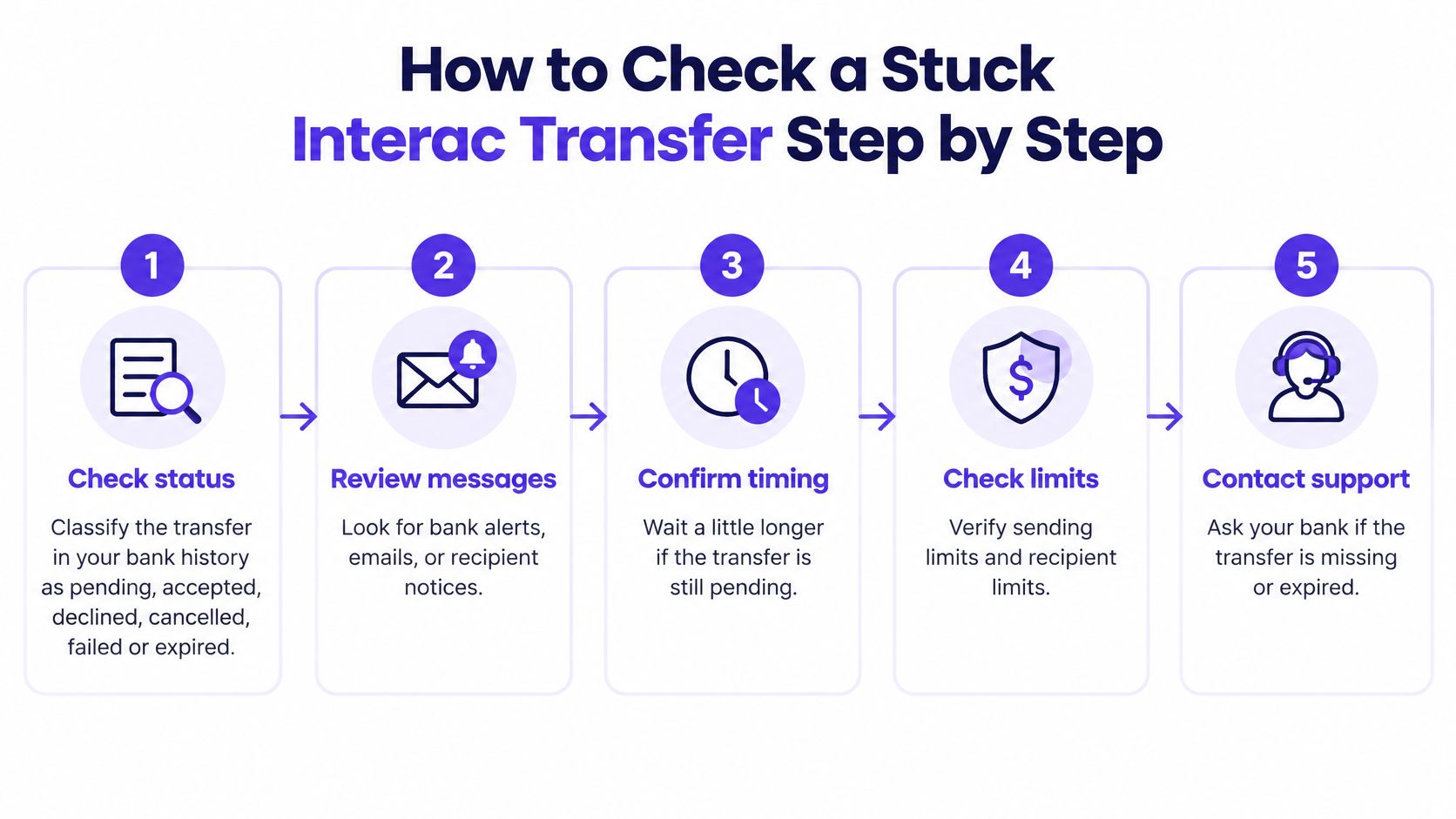
Classify the status in banking history. Find the transfer and identify whether it's pending, accepted, declined, cancelled, failed, or expired. Don't treat a submission confirmation as proof that the recipient received a deposit; save the status exactly as displayed.
Confirm the destination and Autodeposit setup. Read the email address or mobile number back to the recipient through a known channel, and ask whether that identifier is registered for Autodeposit. A typo can direct the notification elsewhere, while an unregistered identifier can leave the recipient needing to accept manually.
Check the security-question process. If the transfer requires an answer, confirm that the recipient understands which answer you set without asking them to paste it into a support conversation. If you need to replace the question, first establish what will happen to the original transfer so you don't leave competing payments open.
Compare messages with the actual transaction record. Review bank alerts and recipient notices, then return to your transaction history for the payment status. Don't use a missing email or an old notification as the deciding evidence when the banking record shows something different.
Cancel only if the payment is still eligible. According to Interac's personal e-Transfer FAQs, cancellation isn't available after acceptance or deposit, and Interac doesn't hold or trace funds. If cancellation succeeds, confirm the resulting bank status before arranging another payment.
Escalate with a complete transaction record. Contact your sending bank or credit union with the timestamp, amount, recipient email or mobile number, and reference number. Ask whether the transaction is awaiting recipient action, under review, rejected, or completed, and request an investigation reference if the debit and deposit don't reconcile.
This visual provides a quick reminder of the checks to keep beside your banking record.
Choose an outcome, not another retry
Wait when the bank confirms processing or a review is still underway and tells you what happens next. Ask what event or update should trigger another call, rather than waiting without a clear next step.
Reclaim when the payment has expired or been cancelled and your bank instructs you to complete a return process. Check the available balance afterward, rather than assuming the status change alone restored spending access.
Escalate further when the bank says the transfer completed but the intended recipient can't reconcile the deposit. The recipient may need to approach their own institution with the corresponding details.
For an international payment, separate the Canadian funding step from identity verification and the onward transfer. Our guide to avoiding low exchange rates and delayed verification when sending money home helps you plan those other checks without confusing them with an unresolved bank payment.
Why Large Transfers Get Declined and What Limits Apply
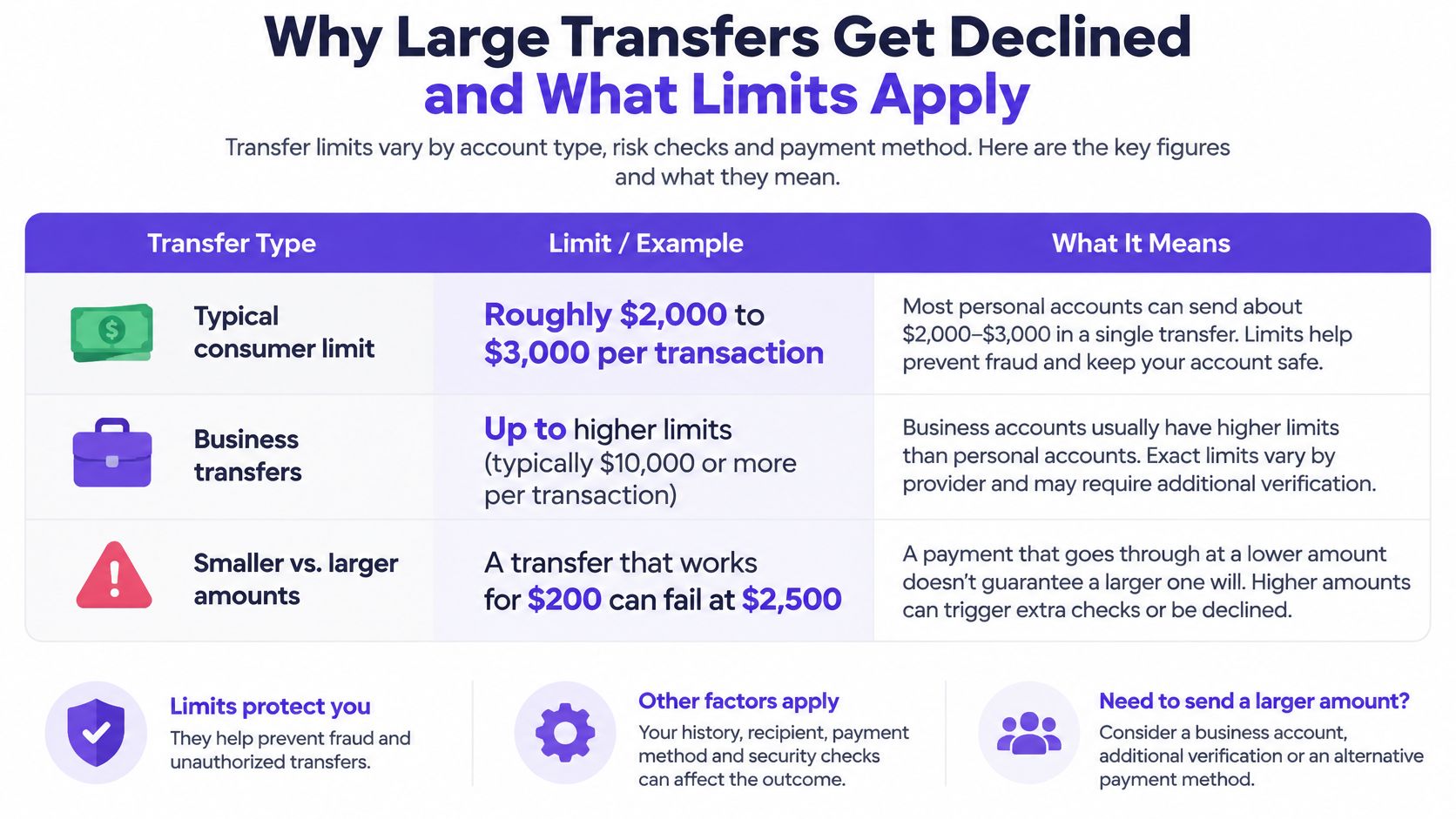
A declined send usually means the amount hit a ceiling your bank set, not that Interac refused the payment. Interac publishes no universal consumer cap. Each bank sets its own per-transaction and cumulative limits, and those vary by account type, so two customers at different institutions can send the same amount and get different results.
| Account or example | Per transaction | Per day | Per 7 days | Per 30 days |
|---|---|---|---|---|
| Personal account | Set by your bank | Set by your bank | Set by your bank | Set by your bank |
| Business account | Set by your bank and account type | Set by your bank and account type | Set by your bank and account type | Set by your bank and account type |
| Example Canadian bank, published limits | $10,000 | $10,000 | $70,000 | $300,000 |
The bottom row is one institution's published schedule, not an industry standard. The ICICI Bank Canada e-Transfer FAQs list $10,000 per transaction and per day, $70,000 per seven days, and $300,000 per thirty days. For every other row, the figure that matters is whatever your own bank's transfer screen shows.
Your bank's available allowance is what matters when you press send.
Having sufficient funds doesn't mean the bank will permit the entire balance to move through Interac e-Transfer. An account that has never sent a large amount can carry a lower effective allowance than its advertised maximum, and a security review can block a payment that sits comfortably inside the published limits.
Check both the payment and the running total
A per-transaction limit caps an individual payment. A cumulative limit restricts what you can send over a specified period, so earlier payments can reduce what remains available.
That distinction explains why a small payment can succeed while a larger one fails. It also explains why splitting a payment may not solve anything: a sender who breaks a declined payment into four smaller sends can still hit the same daily ceiling on the third attempt.
Check these details in your bank's transfer screen or ask support:
- Available allowance: Ask what you can send now, not just the account's advertised maximum.
- Applicable period: Confirm whether the restriction is daily or measured over another cumulative window.
- Account eligibility: Don't assume a personal account has the same allowance as a business account.
- Reason for rejection: Ask whether the bank applied an amount limit, a transaction-count restriction, or a security review.
The limits visual highlights why account type and payment size need to be checked together.
Use a workaround that fits the restriction
Smaller transfers can help when only the individual-payment cap is the obstacle. They won't create additional cumulative capacity, and you shouldn't use them to bypass a security or compliance restriction.
Spacing payments across the bank's permitted period suits a flexible deadline. For an urgent supplier payment, ask whether the bank can review the allowance or whether another payment route is more appropriate, and get the answer in writing if the deadline is tight.
A rejected large payment is a limits question before it's evidence of a network outage.
Keep confirmations, reference numbers, and any cancellation or return records until the payment is fully reconciled. Report a discrepancy promptly rather than assuming a fixed window gives you room to wait.
Recipient, Expiry and Bank-Side Errors
A useful support request identifies which side needs to act. “My transfer is broken” leaves the bank guessing; “my account was debited, the transfer shows accepted, and the recipient can't identify the deposit” gives an investigator something concrete to check.
Sender-side restrictions
Say a Canadian business owner is paying a contractor and the send is declined before confirmation. The first task is to compare the amount with the bank's available allowance, not to ask the contractor to change their deposit settings.
The ICICI Bank Canada e-Transfer FAQs provide an institution-specific example of $10,000 per transaction and per day, $70,000 per seven-day period, and $300,000 per thirty-day period, and state that transfers expire after 30 days. Those are that bank's published conditions, not limits or expiry instructions to assume for every account.
If the amount fits but the bank still rejects it, ask for the actual rejection reason. Repeated attempts without that answer can leave you with more records to reconcile and no clearer diagnosis.
Recipient details and acceptance problems
A wrong security answer, a refused payment, and a mistyped address require different responses. Have the recipient describe what they see, then compare it with your record.
For example, if the recipient expected Autodeposit but the transfer remains pending, check whether the exact address used is registered. Don't assume that having Autodeposit for one address means every email address they use will work the same way.
If your record says accepted but the recipient reports no money, don't conclude that Autodeposit is switched off. Ask them to check the account associated with the registered identifier, then involve the banks if the deposit still can't be identified.
Expiry, missing deposits, and genuine service faults
An expired transfer needs the bank's reclamation process, not another attempt to open the original notification. Check whether your institution requires action to return the money and whether the available balance reflects that return.
For a cleared debit with no identifiable recipient deposit:
- Preserve evidence: Save transaction details and screenshots without exposing passwords or security answers.
- Align the records: Confirm both parties are checking the same amount, identifier, and transaction.
- Request investigation: Use the escalation details from your checklist and obtain a case reference.
- Hold the replacement: Don't resend until the original payment's outcome is established.
A true service fault needs confirmation, not speculation based on one delayed payment. Check official bank service notices and ask support whether an incident affects this transaction; a broad outage notice still doesn't establish whether your particular send completed.
Fraud Risks and Habits That Prevent Failed Transfers
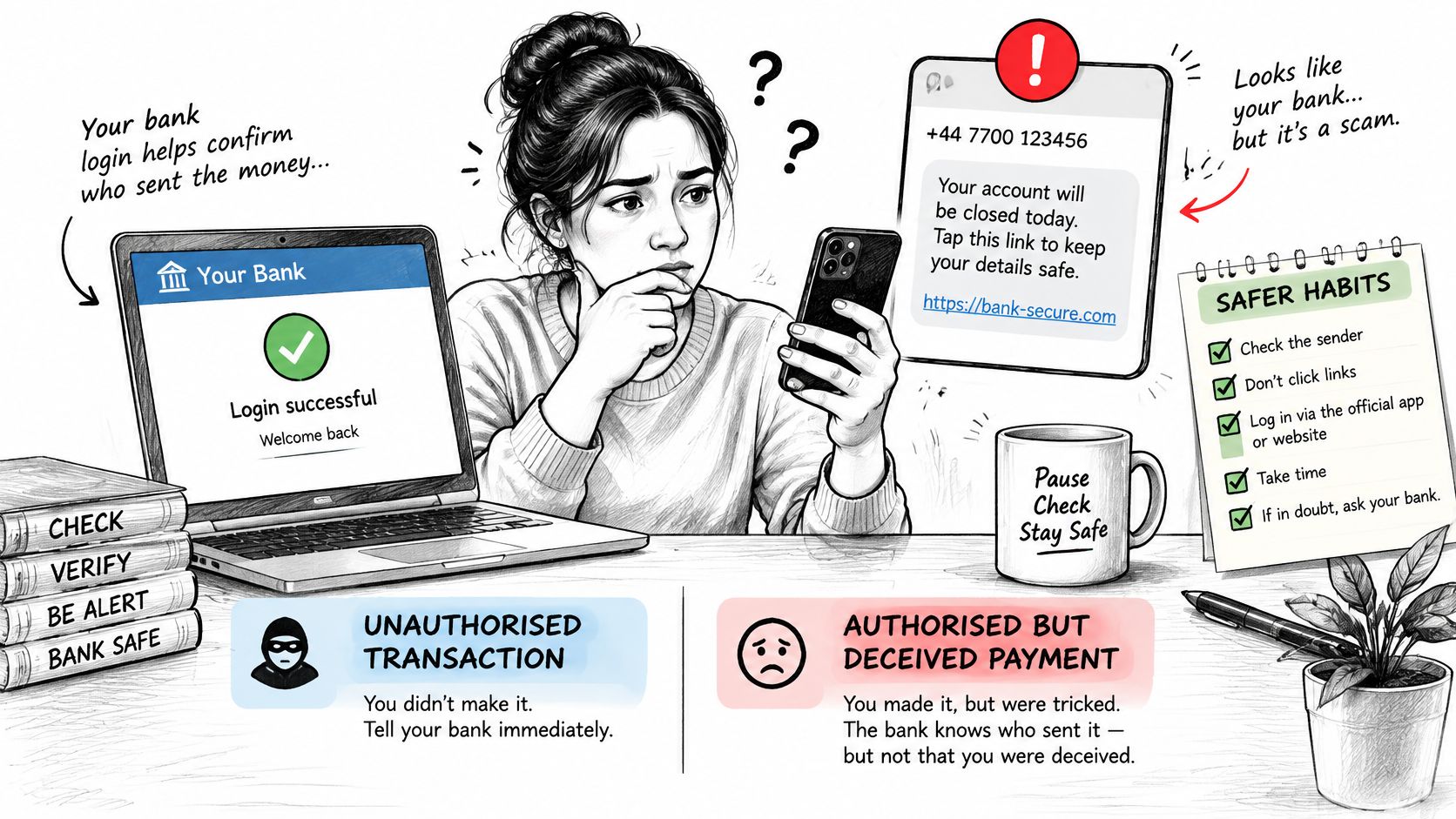
A successful bank login doesn't prove a payment is safe. Authentication helps establish who authorized a transfer. It doesn't establish that the recipient is honest, the invoice is genuine, or the message requesting payment came from your bank.
There's an important distinction between an unauthorized transaction, which you didn't approve, and an authorized-but-deceived payment, which you approved because someone misled you. Describe that distinction accurately when reporting an incident; don't assume that a payment you authorized is harmless or easily recoverable.
Network security doesn't replace recipient verification
Interac's digital-payment security guidance states that its systems prevented $58.4 million in fraud losses in 2021, with less than $0.02 lost to fraud per $100 spent across its Debit and e-Transfer networks in the cited period. Those aggregate figures don't guarantee recovery for a person deceived into sending money to a fraudster.
A scam can also resemble troubleshooting. Someone may claim that your transfer needs an extra payment to release it, that your account requires verification through a text link, or that support needs your security answer.
The illustration below shows the kind of bank-themed message that should prompt independent verification.
Pause when the payment instructions change
A new recipient isn't automatically suspicious. A new recipient combined with urgency, changed bank details, or instructions to misdescribe the payment deserves a pause.
For example, a supplier's email may ask you to pay a different contact because their usual account is unavailable. Call the supplier using a number you already hold, not the number supplied in the changed instructions.
Use these habits before confirming:
- Verify unfamiliar recipients: Confirm their identity and payment details through an established contact method.
- Read the displayed name: If the recipient name doesn't match your expectation, stop and resolve the mismatch.
- Protect the security answer: Don't send it by email or chat, include it in the question, or disclose it to someone claiming to be support.
- Check deposit requests independently: Open your banking app directly instead of trusting an unsolicited pending-deposit link.
- Review changed instructions: Confirm requests to change the amount, destination, or payment purpose before acting.
- Keep evidence: Preserve the payment record and suspicious messages so the bank can assess what happened.
Autodeposit can remove the security-question step for incoming transfers, but it isn't an endorsement of the person receiving your outgoing payment. Our tips for securing online transactions cover additional account-protection habits.
Don't pay someone to “unlock” a payment until your bank has independently verified the problem and the proposed action.
If you suspect fraud, contact your bank immediately through an authenticated channel. Explain what you authorized, what the other person claimed, and whether you disclosed credentials; preserve the evidence and report the incident to the Canadian Anti-Fraud Centre and police as appropriate.
Next Steps Before Your Next Interac Transfer
Before sending again, make one decision: does this payment fit the bank's available allowance and the recipient's confirmed setup? Check the amount, destination identifier, and expected acceptance method together. If they don't fit, choose a suitable route before creating another transaction.
Keep a usable payment record
Save the reference number with the bank's final status, not just the initial confirmation. For a cross-border payment, keep the Canadian funding record separate from the onward-transfer record so support can identify which stage needs attention.
When comparing options, our guide to choosing an online money transfer platform can help you assess funding methods and transaction visibility. Check the actual transaction preview rather than assuming a fee or exchange rate.
Bring the confirmed outcome to the right team
If the funding step fails, ask the sending bank to establish what happened to the bank-side payment first. Then bring that outcome and the transaction reference to our support team at Africhange for help with the funding step.
Our Secure Wallet uses Interac to receive money and store it securely in your wallet. A bank confirmation and a wallet balance are different records, so an unresolved mismatch needs reconciliation rather than a duplicate send.
Africhange displays the exchange rate and the amount your recipient will receive before you complete a transfer, with no hidden fees. Once you've confirmed your bank limits and resolved any outstanding funding issue, visit Africhange to review your next transfer before sending.